QR Code Generation: Everything You Need to Know
What is a QR Code?
A QR code, short for Quick Response code, is a two-dimensional barcode that can be scanned by smartphone cameras to quickly access digital information. Unlike traditional barcodes that store data in one dimension, QR codes store information in both horizontal and vertical directions, allowing them to hold significantly more data.
QR codes have become ubiquitous in modern life — restaurant menus, product packaging, business cards, marketing materials, and event tickets all commonly feature them.
How QR Codes Work
When you scan a QR code with your phone's camera, the code is decoded into a specific action:
- Opening a URL — Directing you to a website or landing page
- Displaying text — Showing a message or contact information
- Adding a contact — Saving a vCard to your phone's address book
- Connecting to Wi-Fi — Automatically joining a wireless network
- Making a payment — Initiating a financial transaction
Types of QR Codes
Static QR Codes
Static QR codes contain data directly within the code itself. The content is permanent and cannot be changed after generation. They are ideal for URLs, contact information, and Wi-Fi credentials.
Dynamic QR Codes
Dynamic QR codes contain a short URL that redirects to the actual content. This allows you to update the destination without changing the QR code itself, making them useful for marketing campaigns.
How to Generate QR Codes Online
Using the QR Code Generator
The QR Code Generator on Tool-web creates high-quality QR codes instantly. You can generate QR codes for URLs, text, email addresses, phone numbers, and more. The tool offers customization options for colors and size.
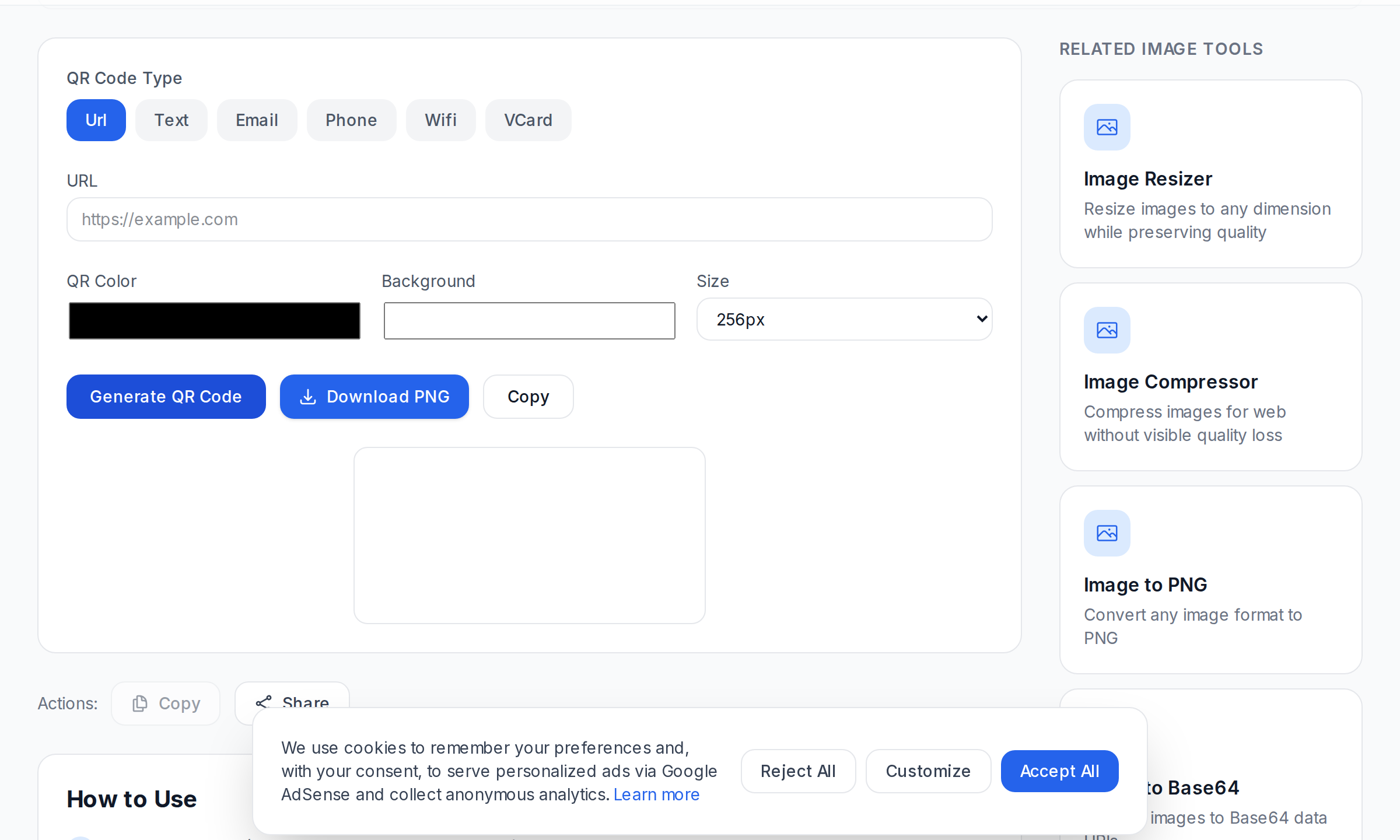
Steps to Generate a QR Code
- Navigate to the QR Code Generator
- Enter your content (URL, text, contact info, etc.)
- Customize the appearance if desired
- Click "Generate" to create the QR code
- Download the image in your preferred format
QR Code Best Practices for Marketing
- Place them prominently — Ensure the QR code is large enough to scan easily.
- Add a call to action — Tell people what they will get by scanning.
- Test before printing — Always test with multiple devices before printing materials.
- Track performance — Use UTM parameters in your URLs. The UTM Builder helps create trackable URLs.
- Ensure adequate contrast — Dark codes on light backgrounds scan most reliably.
QR Codes for Business
- Restaurant menus — Link to digital menus for contactless ordering
- Business cards — Add a QR code that saves your contact info directly to phones
- Product packaging — Link to user manuals, warranty registration, or product details
- Event tickets — Use as digital tickets for concerts, conferences, and flights
- Payment systems — Enable quick mobile payments at retail locations
Barcode vs. QR Code
While QR codes are a type of barcode, they differ from traditional one-dimensional barcodes:
- Data capacity — QR codes store up to 7,089 characters vs. about 20 for standard barcodes
- Scanning direction — QR codes can be scanned from any angle
- Error correction — QR codes can be read even if partially damaged (up to 30%)
- Visual complexity — QR codes are two-dimensional patterns
For product inventory and retail, traditional barcodes generated with a Barcode Generator remain standard. For everything else, QR codes offer more flexibility.
References
Frequently Asked Questions
Do I need a special app to scan QR codes?
No, most modern smartphones scan QR codes using the built-in camera app. Point the camera at the code and it will be recognized automatically.
How big should a QR code be for printing?
The minimum is about 2cm x 2cm, but 3cm x 3cm or larger is recommended for reliable scanning.
Can QR codes expire?
Static QR codes never expire. Dynamic QR codes may expire if the redirect service stops working.
Can I customize the look of a QR code?
Yes, you can customize colors, add logos, and change patterns while maintaining sufficient contrast for scanning.
Are QR codes secure?
QR codes themselves just store data. Security depends on the content they point to. Always scan codes from trusted sources.
Can a QR code contain a virus?
A QR code cannot contain a virus. It only stores data like text or URLs. However, it could link to a malicious website.
How do I know if my QR code is working?
Test with multiple devices before distributing. Check that the correct URL loads and displays properly on mobile.
Conclusion
QR codes are a versatile tool for connecting the physical and digital worlds. Start creating your own QR codes with the QR Code Generator, and explore the Barcode Generator and UTM Builder for comprehensive tracking and management.
Frequently Asked Questions
Do I need a special app to scan QR codes?
How big should a QR code be for printing?
Can QR codes expire?
Can I customize the look of a QR code?
Are QR codes secure?
Can a QR code contain a virus?
How do I know if my QR code is working?
Related Tools
Try these free online tools mentioned in this article:
QR Code Generator
Generate QR codes for URLs, text, Wi-Fi, and contact details
Thumbnail Maker
Create custom thumbnails for videos and blog posts
Mobile Friendly Tester
Test how your website looks on mobile devices
Slogan Generator
Create catchy slogans and taglines for brands
Color Blindness Simulator
Simulate how images appear to people with color vision deficiency
Related Articles
Social Media Marketing Tools You Didn't Know You Needed
Discover hidden-gem social media marketing tools that will supercharge your content strategy and boost engagement across all platforms.
Password Security: Generation and Strength Checking
Use the generator and strength checker for what they actually do best: creating strong random passwords and stress-testing the ones you already have.
15 Essential SEO Tools Every Website Owner Needs
Discover the must-have SEO tools that will help you analyze, optimize, and monitor your website's search engine performance.
How to Create and Edit PDF Documents Online
Learn how to create, edit, and manage PDF documents online using free browser-based tools. No software installation required.